
Magento 2 connector B2B User Guide
Description
Magento 2 Connector B2B provides powerful integration functionality to synchronize customers and customers' company data between Magento and NetSuite.
The extension provides new features.
- Importing customers from NetSuite into Magento.
- Importing companies from NetSuite into Magento.
- Exporting customers' companies from Magento to NetSuite.
- Assigning customers to a company in Magento by a company NetSuite internalId.
- Assigning customers to a company in NetSuite by a company NetSuite internalId.
Imports and exports run by the netsuite-connector cron job.
The extension allows manually run customers' import process by the CLI command "netsuite:utils:importcustomer".
The extension allows manually run companies' import process by the CLI command "netsuite:utils:importcompany".
The extension supports only Magento 2.3.* B2B versions.
Restrictions
For the successful company import, a NetSuite company must have "companyName" attribute value or this value will be taken from the "entityId" attribute. The "companyName" attribute is used as the company admin user's first name
If the company does not have "vatRegNumber" attribute will be thrown exception and the company won't be imported. The "vatRegNumber" attribute is used as the company admin user's last name
Requirements
- Magento 2 requirements (here)
- Installed Magento B2B 2.3.* system
Installation through composer
composer config repositories.netsuite-b2b vcshttps://rocketweb.git.beanstalkapp.com/netsuite-connector-b2b.gitcomposer require rocketweb/netsuite-connector-b2bphp bin/magentosetup:upgradeOnly in production mode: php bin/magentosetup:di:compile &&php bin/magento setup:static-content:deployphp bin/magento cache:flush
Configurations
Go to Stores → Settings → Configuration → ROCKET WEB → NetSuite → Enable/Disable Features
Enable exporting customers' companies, importing customers and importing companies and save the configuration.

Picture 1 - Configuration to enable/disable exporting companies to NetSuite and importing customers and companies from NetSuite.
Go to Stores → Settings → Configuration → ROCKET WEB → NetSuite → Customers Import
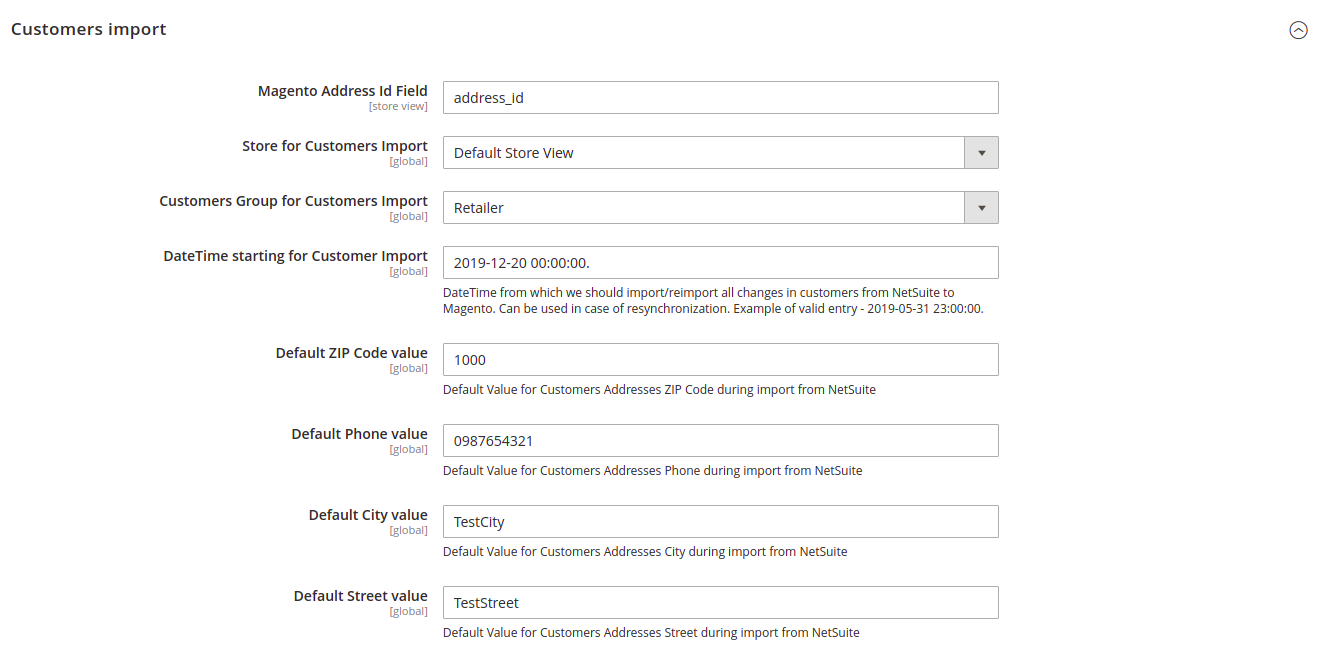
Picture 2 - Configuration of the customers' import process.
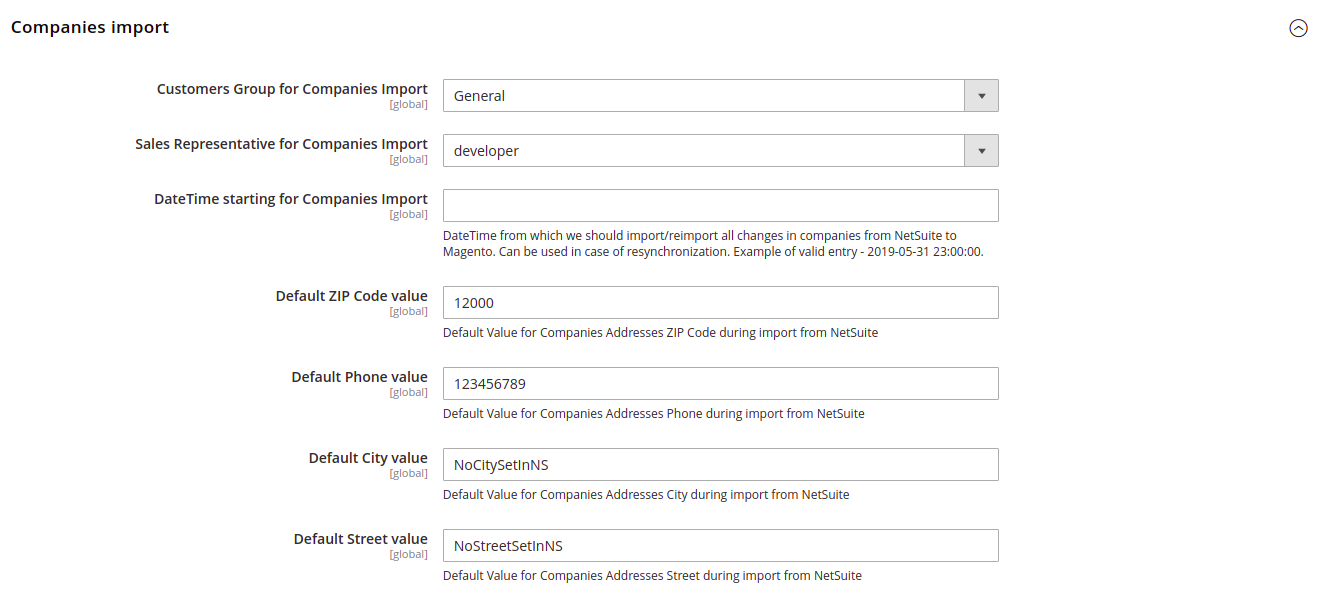
Picture 3 - Configuration of the companies' import process.
Deleting the Magento 2 Connector B2B extension
composer remove rocketweb/netsuite-connector-b2bphp bin/magentosetup:upgradeOnly in production mode: php bin/magentosetup:di:compile &&php bin/magento setup:static-content:deployphp bin/magento cache:flush
No comments to display
No comments to display