
XG - Google Shopping Feed product page content
https://xtensiongalaxy.com/google-shopping-feed.html
Short Description:
Recommended by Google AdWords team for managing Google Shopping listings from Magento.
Long Description:
Google Shopping Feed for Magento allows you to supply Google with highly relevant data in the most efficient way possible. We haven't settled for just making a feed that will "pass", we provide the tool-set for you to dominate Google Shopping results.
The features of this extension have been driven by an internet marketing expert, and our customers. The main goal is to product feed data that is exactly what Google wants. Please review our User's Guide as well as the Version History tab below to see some our our latest developments.
If you sell Apparel and define all your sizes and colors as custom product options and not Configurable products with Associated Simple Products, our extension will not work properly for you.
Supported Magento Versions: Enterprise 1.9.2 - 1.14.x, Community 1.4.2 - 1.9.x
During installation and configuration, if you run into anything that does not work according to our documentation, please open up a support case at help.rocketweb.com and we'll be sure to resolve it.
Rough Draft
Here is our rough draft for the Xtension Galaxy Google Shopping Feed Page.
Images:




Content:
About Us
Rocket Web is WINNER 2013 & 2014. THE ONLY BACK-TO-BACK MAGENTO SITE OF THE YEAR WINNER. Rocket Web is a full service Magento strategy, design and development boutique based in the Chicago area. We are continuously driven to innovate and solve complex problems with elegant solutions. Focusing on the specialty foods, relaxed luxury goods and B2B verticals, Rocket Web offers a personalized, adaptive approach in partnering with merchants to dominate their market.
Features
- Support multiple feeds for the same store
- Allow setting different currency than the store displayed on
- Support for google inventory feeds
- A new interface for managing feeds
- FTP uploads support
- Added run schedules with multiple runs per day
- Access to the feed processing logs
- Easy feeds migration from staging (import/export)
FAQ
How Do I Set up the Extension?
Our extension does not use the Google API but rather generates a text based feed on your server. This feed can then be updated via cron on a nightly basis. When you log into Google Merchant Center you can then point Google to this feed and tell it to fetch the feed each day as well.
Can I Generate Multiple Feed For Different Websites?
What do I do if I get a 404 Error when selecting the plugin on configuration page?
This happens sometimes when installing an extension. The best course is to log into the admin page and then log back out. This should resolve the issue.
Is Google Shopping Feeds Open Source?
Yes. We don't use encryption. The feed is 100% open source, so the code base can be used across a variety of projects. You can also purchase multiple installs above if needed.
Does the Extension Support MAP Pricing?
No. The extension will not support MAP pricing.
Can I Exclude Products With a Specific Attribute?
Yes. Follow the steps below.
1. Set a find and replace rule to translate desired value to an empty string
2. Set the Skip empty, add the attribute to a column, than set the Skip if empty with that column in the feed configuration.
Is there an Automatic Upload Date Feed?
Yes. You can find the feature in the Merchant Center and using the feed file link provided ino our extension. Link the file to the Merchant and it will automatically upload the feed at your specified time.
Can I Apply Custom Labels To Product Groups For Better Management in Adwords?
The extension can apply custom labels to product groups. Our wiki page gives a detailed description of how to implement it Running AdWords Shopping Campaigns
Updated Proposal (4/6/2016)
Badges
- Add badges from bottom of page to white space below About Developer.
- Resize images to fit comfortably in the space
Testimonials
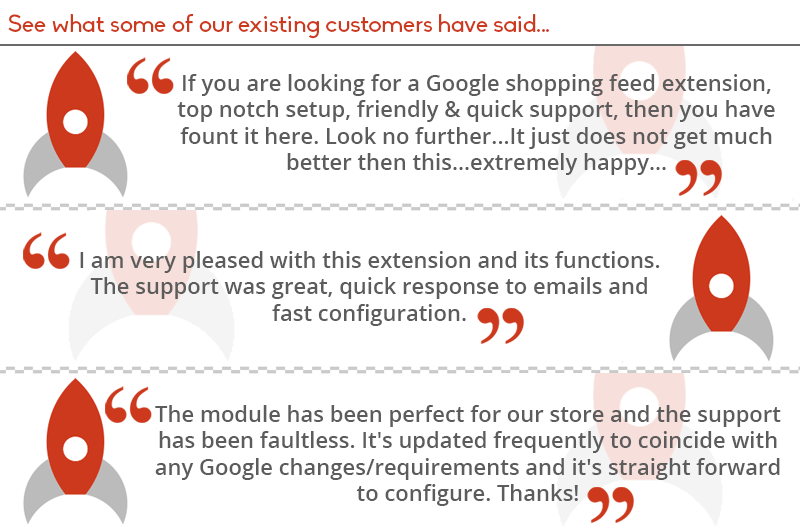
- Once testimonial image should be sufficient. We should focus on a mixture of content and images for better conversion rates and SEO purposes
- Good testimonial to use..."The module has been perfect for our store and the support has been faultless. It's updated frequently to coincide with any Google changes/requirements and its straight forward to configure. Thanks"
Add in More Info For Installation/Configuration
- There has been confusion from some customer purchasing installation + configuration, so a clearer explanation would be beneficial
- Adding something just below where the installation is purchased will make it very clear what the customer is purchasing
- Example from Tony: "We offer professional installation and configuration, this service includes: extension installation via FTP or SSH - CRON implementation - Extension Optimized Configuration - Google Merchant Setup and Submission"
Up-sell the Install/Configuration
We could have a little thing explaining why buying the install and configuration is recommended. Something as simple as "We recommend going with the install and configuration because we make sure your feed is working seamlessly."
We can add this in the white space on top or the main description.
This could make the price of each sale go up just from people who planned on purchasing the extension regardless.
FAQ Section
- Adding in FAQ is great for addressing common customer questions
- This helps support focus on more difficult questions
- Below are a list of questions and answers to customer inquiries that Tony has compiled
Question:
I have installed the extension but it is not appearing my Magento Admin
Answer:
Attempt to re-install the extension, make sure no steps from installation wiki is missed. Logout and log back in to clear admin user permissions. If the issue has not been resolved, please contact our support desk.
Question:
After installation of the extension I am receiving an error saying "No heartbeat detected. Feeds won't generate, please check that the Magento CRON is running."
Answer:
Please check that the CRON is setup properly. Please refer to http://devdocs.magento.com/guides/m1x/install/installing_install.html#install-cron for implementing the CRON.
Question:
I have several errors in my Merchant Center. How do I troubleshoot the feed file?
Answer:
Please download the full report from the Merchant Center and review the errors. In the extension, you have the ability to test a SKU or byproduct id. Take a look to see if there are missing attributes or incorrect data. The most common errors or warnings are missing: shipping data, tax, color, size, age group, gender, product type, and product category. You can take a look at our user guide for help. This is found at https://rocketweb.atlassian.net/wiki/display/RSF/Rocket+Shopping+Feeds
Question:
I am receiving errors regarding my pricing and inventory stock status.
Answer:
Please make sure that the CRON is implemented properly and that the latest feed file is being generated. In most cases an old feed file is being submitted to the Google Merchant Center. Also, if prices are changing often in the catalog, activate microdata for automatic item updates.
Question:
I am unable to locate my extension download or files. It is no longer available to download in my account.
Answer:
When you purchase the extension you get 90 days of FREE support and access to upgrades. After 90 days, you will be unable to download the extension directly from your account. Please contact support and we will provide you with the latest extension version that would have been available to you.
Video Embedded inside of Description:
Here is just a raw quick run through of the widget:
A video of the widget is a good idea because it shows the customer how user friendly it is.
- No coding needed
- Category Mapping is Seamless
Competitor Listing:
Amasty Product Feed has a good looking description. We should have some graphics similar on our Xtension Galaxy Page. (Please see the "7 Reasons to Choose" Image on this page https://amasty.com/product-feed.html )
Side Note - Based on their screenshots, they do not look like they are very user friendly compared to our extension. It looks very basic and the amount of things you can do within the widget seem extremely limited.
I am adding this to the competitors page as well (Competitors)
Imported Confluence comments (6)
Matt MacDougall 2016-03-21
The new rocket web site without the ability to buy extensions will be going live on April 4th. This means all sales of Google Shopping Feed will happen here: https://xtensiongalaxy.com/google-shopping-feed.html
This is a little scary because we haven't taken any live orders for GSF here. We should start sending live customers here this week incase there's a disaster and we need to revert sales back to the old site before taking it down.
I'm spending some time here pretending I'm a customer to make sure the experience is acceptable. Certainly one thing we can vastly improve on is the content of this page and how we present this extension to prospects. The videos we had on rocketweb.com are very outdated. I think at a minimum we can do something more like this: https://xtensiongalaxy.com/sweet-tooth-loyalty-and-reward-points.html with some inline screens and maybe a couple videos in the description.
Matt MacDougall 2016-03-22
Dorin Mirulescu what's this "Allow setting different currency than the store displayed on"? Also what are some benefits of this "Access to the feed processing logs" ... is it just exposing a text file?
Dorin Mirulescu 2016-03-23
- Feed Currency is a dropdown under General Config tab. This allows you to output the feed in the desired currency, before adding this the feed was outputing only the store displayed currency, not allowing currency conversions.
- Access to the feed logs, is exposing the log text through the admin.
Matt MacDougall 2016-03-22
Added some content improvements here. https://xtensiongalaxy.com/google-shopping-feed.html
Suggest refinements.
Still need to add some Faq's to this page.
I didn't add all the banners because the amount of rockets on the page was getting a bit nuts. This page as is may be better with the background shadow rockets removed from the testimonial block.
Vince Malfeo (Unlicensed) 2016-03-22
Matt MacDougall
Good point! Here is that same image without the shadow rockets.
Corey Schmitz (Unlicensed) 2016-03-23
Could relocate the badges to the top under "About Developer" to fill in some empty space.
No comments to display
No comments to display