
General Configuration
Store View
Product information may vary by store view, and setting the store view here will make the feed to pull product information in corresponding store context.
Changing the Store View here, would require you to review the Categories Map definition, as category tree depends on the store. Save Page before reviewing categories map.
If you have multiple stores targeting different countries and languages, you may want to create a feed for each of those stores.
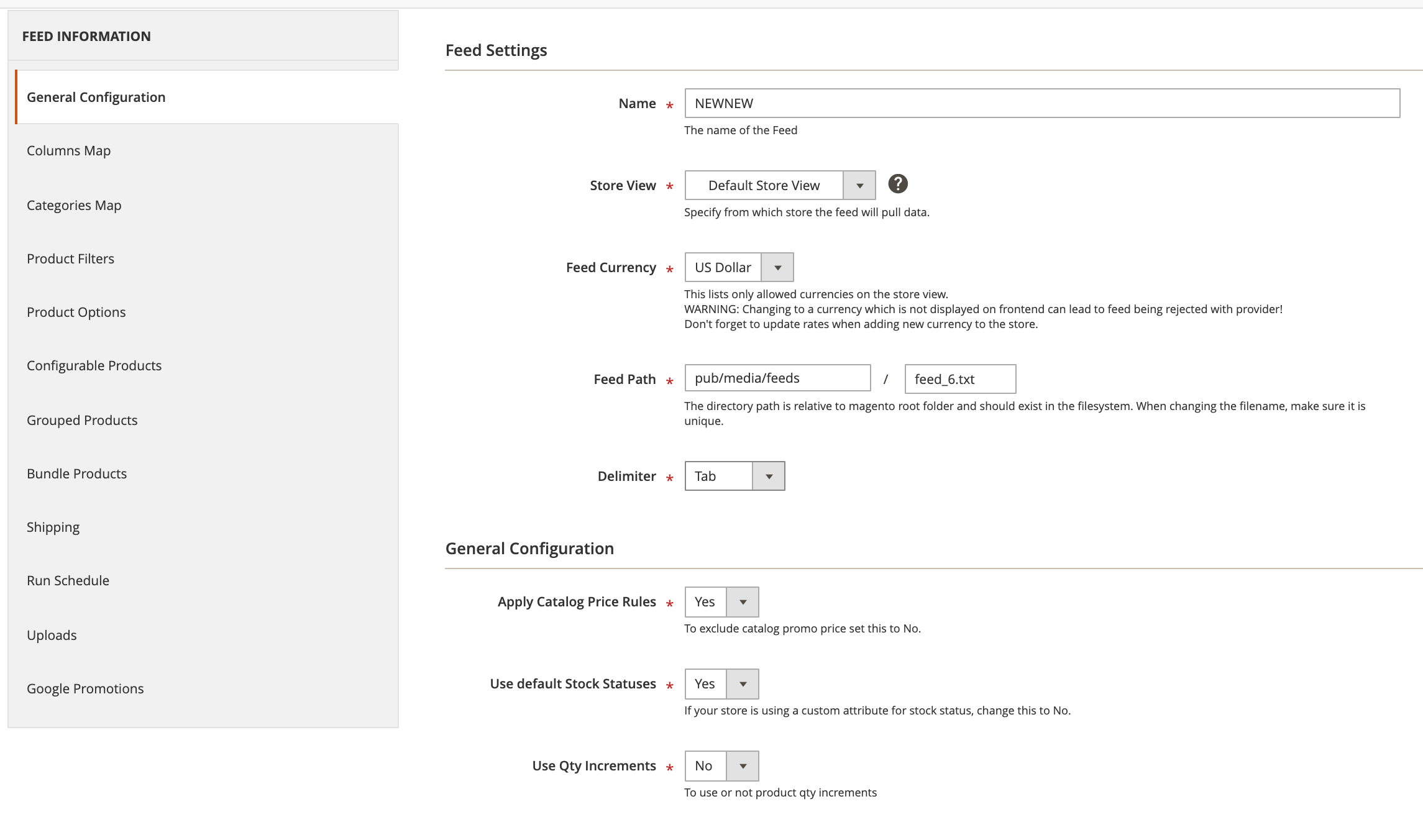
When you change the store view, Feed Currency should be set to the default displayed currency for that store. (see Fig 10.1)
Fig 10.1 General Configuration
Feed Currency
Allows you to choose which of the allowed currencies should be used when calculating prices. If Feed Currency is different from the Display Currency of that store, prices will be converted to the appropriate currency.
We recommend setting the Feed currency to match the display currency, so the feed and the product pages will display the same price.
Feed Path
"Feed path" is relative to the web root like: [magento_root]/pub/media/feeds/ but you can set an alternate save path. Make sure the feed path has enough write permissions for both web server’s user and cron user if they are different. Ask your web hosting company for help if needed.
By default feed file follows format: feed_[id].txt. When changing it, make sure it is different for each of your feed, otherwise they get overwritten. A link to the file will be displayed in the feed grid once the file is generated.
Delimiter
Defaults to tab, but it can be changed to comma or other character. Extension automatically cleans up delimiter from product content, but you should keep a eye for variations of the delimiter character like unicode format, etc.
Apply Catalog Price Rules
Whether to include Magento catalog rules when computing prices on products. This has direct influence on how the Sale Price is being computed, in addition to product Special Price attribute, when this option is set to yes, promotions will affect whether Sale Price gets populated or not.
Use default Stock Statuses
By default, it is set to yes, using regular Magento stock information to compute whether a product is out of stock or in stock. When it is set to No, it will allow you to specify a custom attribute which has to hold valid values for stock status, this can be found under Alternate Stock/Availability Attribute setting.
The attribute's values can be: 'in stock', 'out of stock' and 'preorder'. Other values will be replaced by 'out of stock'.
Use Quantity Increments
Affects how prices are computed, it will multiply the amount with the minimum number of items to purchase.
No comments to display
No comments to display